1.1.1.1 + WARP
Screenshots
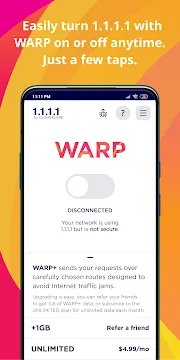
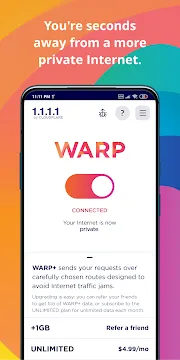

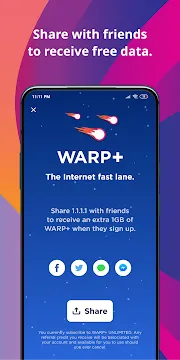
Stay safer online with the 1.1.1.1 + WARP app for Android. This free tool from Cloudflare upgrades your mobile internet in two key ways. First, it makes your connection private by switching your DNS to a faster, more private resolver. Then, with one tap, it adds the powerful WARP security feature. Essentially, this app creates a secure tunnel for all your phone’s internet traffic. This shields your data from snoops on public Wi-Fi and other networks.
Activating WARP provides meaningful security benefits for everyday browsing. It encrypts the data leaving your device, keeping your online activity more private from your internet provider and network observers. As a result, it helps protect your personal information while you bank, shop, or simply browse. Importantly, this is not a full VPN for changing location, but a VPN for safer data transmission. Therefore, you get crucial protection without complicated settings.
Here is what the 1.1.1.1 + WARP App does for you:
- Encrypts your internet traffic for stronger privacy on any network.
- Speeds up domain name lookups using Cloudflare’s fast 1.1.1.1 DNS.
- Blocks trackers and malware in its optional WARP+ mode.
- Operates with a simple one-touch switch to turn protection on or off.
- Works automatically in the background once enabled.
In summary, this app is a straightforward upgrade for your Android’s internet safety. It is designed for simplicity and performance. For anyone seeking an easy way to add an essential layer of security, 1.1.1.1 + WARP is a powerful and reliable choice. Finally, take control and make your everyday browsing significantly more private.
Get 1.1.1.1 + WARP APK for Android
You want a faster, more private internet connection. Cloudflare’s 1.1.1.1 with WARP helps you achieve this. It makes your browsing more secure. You can install it easily using the APK file. We will guide you through the process.
Why Use the 1.1.1.1 + WARP APK?
This app secures your connection. First, it encrypts your DNS queries. This stops your Internet Service Provider (ISP) from snooping. Next, WARP technology optimizes your mobile traffic. It often improves your connection speed and reliability. Therefore, you get a better mobile experience.
Step 1: Prepare Your Android Device
You must adjust a setting before installation. Android security usually blocks installations from unknown sources. You need to change this setting temporarily.
- Go to your phone’s Settings.
- Find the Security section. This may be under “Privacy” or “Biometrics and security” on some phones.
- Look for the option called “Install unknown apps” or “Unknown sources”.
- Enable this setting for your web browser (like Chrome or Firefox). You give your browser permission to install the APK file.
Step 2: Download the 1.1.1.1 + WARP APK
- Open your enabled web browser.
- Visit Filetomob.com.
- Search for the “1.1.1.1 + WARP APK” download.
- Locate the app page.
- Tap the download button.
- Confirm the download if your browser asks. Your phone saves the file, typically to your Downloads folder.
Step 3: Install the APK File
Now you have the file. You will use your device’s file manager to install the application.
- Open your File Manager app.
- Navigate to the Downloads folder.
- Find the 1.1.1.1 + WARP APK file. Its name will look similar to com.cloudflare.onedotonedotonedotone.apk.
- Tap on the file name.
- Your device will prompt you to install the app. Tap Install.
- Wait for the installation process to finish. You see a confirmation message.
Step 4: Configure and Activate WARP
The app is now on your device. You just need to turn it on.
- Tap Open after installation or find the new 1.1.1.1 app icon.
- Read and accept the Terms of Service.
- You will see a large toggle switch. Tap it to connect.
- Your phone will ask you to set up a VPN Connection. This is normal.
- Tap OK or Allow to create the VPN profile.
- The toggle switch should turn green. You are now connected to WARP.
Next Steps
Your internet connection is now safer and faster. Remember to disable the “Install unknown apps” permission for your browser. This keeps your device secure from accidental downloads in the future.
Get Started with 1.1.1.1 + WARP for Android
You installed the app. Now you can easily make your Android connection better. First, understand the core modes and features. You control your internet experience.
Key App Modes: WARP and DNS Only
The 1.1.1.1 app gives you two powerful modes. You choose the level of privacy and security.
1. WARP Mode (Default)
- This is the full-service option.
- WARP encrypts your whole connection.
- It protects your DNS queries. DNS queries translate website names into IP addresses.
- It uses an optimized, modern protocol.
- Therefore, your entire internet traffic is secure and private. Your mobile provider cannot snoop on your activity.
2. 1.1.1.1 (DNS Only) Mode
- This is the lightweight option.
- It only uses the faster, private 1.1.1.1 DNS resolver.
- It does not encrypt your entire connection.
- This mode can be useful. Certain apps might conflict with the full WARP tunnel.
- To switch modes, look for the settings or mode selector inside the app.
1.1.1.1 for Families: Essential Security
You can add a crucial security layer. This feature is important for family devices.
1.1.1.1 for Families allows you to block unwanted content and threats right at the DNS level.
You can select filtering options. You make the internet safer instantly.
- Malware/Security Threats: Block access to sites known for phishing and malware. You protect your device from danger.
- Adult Content: Block access to adult websites. You keep the internet appropriate for children.
Find these options in the app’s DNS settings menu.
WARP+ Option: The Speed Upgrade
The free WARP mode is fast. However, an upgrade offers even more speed.
WARP+ is a paid subscription service.
- It uses Cloudflare’s Argo network technology.
- This network finds the fastest path over the internet.
- It helps you bypass congested traffic lanes.
- You get an optimized route for your data. This makes your connection even quicker.
You can find details about the WARP+ upgrade inside the application.
Ready to start? Simply tap the large button on the main screen to activate WARP.
Full Connection Security: 1.1.1.1 + WARP for Android
You want a faster, safer internet connection on your Android phone. You might already know about 1.1.1.1. This is Cloudflare’s fast, privacy-first public DNS resolver. But the mobile app offers much more. It includes a powerful feature: WARP.
What is WARP? (The Lightweight VPN Alternative)
WARP is not just a DNS changer. It is a fundamental shift in connection security. WARP secures all the data traveling from your device.
- It creates a secure tunnel. Your internet traffic travels through this encrypted path.
- This protects your data from outside attacks.
- The system uses a modern, optimized protocol. Think of it like a lightweight VPN.
- This protocol is faster and more efficient than older VPN standards.
Therefore, WARP is much more than a simple setting change. It is a full upgrade for your connection.
Key Distinction: Focus on Security, Not Hiding
Traditional VPNs hide your geographical location. They help you bypass geo-restrictions. However, WARP works differently.
- WARP’s primary goal is security.
- Its second goal is performance.
- It does not hide your physical location. WARP focuses on making your connection safe and fast.
Core Benefits of WARP on Android
Installing and using WARP brings major improvements to your Android experience. You gain several key advantages immediately.
Greater Encryption
Public Wi-Fi networks are often dangerous. Snooping is easy for hackers on these open networks. Consequently, your private data is at risk.
- WARP prevents this risk.
- It encrypts all traffic between your Android device and the Cloudflare network.
- This encryption happens automatically.
- You stop snoopers from viewing your personal information.
Improved Reliability
Your Android device constantly switches networks. You move from home Wi-Fi to mobile data, or to a coffee shop’s public Wi-Fi. Indeed, these switches can cause drops and stalls.
- The WARP app handles these transitions with grace.
- It is specifically designed to manage poor connections.
- The result is a more reliable and stable internet experience.
Enhanced Performance
A more secure connection should not mean a slower connection. In fact, WARP improves your speed.
- Cloudflare maintains an optimized global network.
- WARP routes your traffic through this massive network.
- The system finds the shortest and fastest path for your data.
- You experience quicker loading times and faster responses.
Ultimately, WARP gives your Android device a connection that is both secure and fast. It offers modern protection without the typical performance hit.
Why You Need 1.1.1.1 + WARP
Your Android phone needs better protection. 1.1.1.1 and WARP deliver it. This tool is not just for tech experts. It’s for anyone who uses the internet. We will show you who benefits most.
Are You a Public Wi-Fi Warrior?
You love the convenience of free Wi-Fi. Coffee shops, airports, and hotels offer this. But public Wi-Fi is risky. Many people use the same network. Hackers can easily spy on your data.
- You connect to the free Wi-Fi.
- Someone else tries to peek at your activity.
- WARP instantly encrypts your connection. This stops the spying.
- Your data stays private. You can browse without worry.
In short, WARP makes any public hotspot safe. You get security instantly.
Are You a Privacy Advocate?
Are you tired of being watched? Your Internet Service Provider (ISP) monitors your activity. They often see every site you visit. This happens because of your DNS queries.
1.1.1.1 changes this. It offers a private DNS resolver.
- First, your phone asks for a website’s address.
- The request goes through 1.1.1.1’s secure network.
- Crucially, 1.1.1.1 does not sell your data. They don’t track you.
- Your ISP sees less about your browsing. You regain control of your digital life.
Therefore, this tool is essential for true online privacy.
Are You a Gamer or Streamer?
Slow speeds ruin the fun. Lag spikes frustrate you during a game. Buffering stops your movie stream. WARP helps fix these issues.
The internet path is sometimes crowded. WARP finds a better, less congested route.
- You start your game or streaming app.
- WARP+ (the premium feature) routes your traffic over Cloudflare’s optimized network.
- This path is often shorter and faster.
- You experience a more stable connection.
- The result is lower latency and fewer interruptions.
So, for a smoother experience, try WARP+.
Are You a Parent or Guardian?
Children need a safer browsing environment. The internet can be unpredictable. You need a simple way to protect them. 1.1.1.1 for Families provides this.
This feature adds security at the DNS level. You simply change your settings.
- You set up the “1.1.1.1 for Families” option.
- The system blocks known malware and adult content.
- Hence, the entire Android device is shielded.
- Your children can explore the web more safely.
You actively create a safer space for your family. This is a powerful, simple solution.
Conclusion: The Easy Answer
1.1.1.1 + WARP offers speed and security. It serves a wide range of users. Use it on public Wi-Fi. Protect your privacy from your ISP. Improve your gaming experience. Keep your family safe.
Frequently Asked Questions: 1.1.1.1 + WARP for Android
What is the 1.1.1.1 + WARP app?
This app gives you a faster and more private connection to the internet. Cloudflare developed this tool.
It combines two main features:
- 1.1.1.1 DNS: This is a Domain Name System resolver. It translates website names (like google.com) into IP addresses. It is known for its speed.
- WARP: This is a virtual private network (VPN) feature. It encrypts your device’s traffic.
Therefore, the app makes your connection secure and quick.
How does the app protect my privacy?
The app encrypts more of your data traffic. Consequently, it prevents others from snooping on your activity.
Here are the key privacy benefits:
- It stops your Internet Service Provider (ISP) from tracking your browsing history.
- The WARP feature encrypts data leaving your phone.
- Cloudflare has a strict policy: They do not sell your data.
How does the app make my internet safer?
The app enhances your safety in several ways:
- Encryption: WARP encrypts all your traffic. This stops your ISP or local network snooper from seeing what you do online.
- DNS Privacy: 1.1.1.1 does not log or sell your DNS query data. This protects your browsing history from being monetized.
- Security Features: You can enable 1.1.1.1 for Families in the app settings. This feature blocks access to sites known to host malware or adult content.
Is WARP a traditional VPN?
No, WARP is not a traditional VPN. It uses VPN technology, but its goal is different.
For example, a regular VPN often hides your geographic location. WARP focuses on security and speed.
- WARP secures your connection’s traffic.
- It does not hide your original public IP address from the websites you visit.
- However, it still protects your data from being intercepted on local networks, like public Wi-Fi.
Is the 1.1.1.1 + WARP app free to use?
Yes, the basic 1.1.1.1 with WARP is free. You can download it for free on Android.
In addition, there is a paid option called WARP+.
- WARP+ uses Cloudflare’s network to find the fastest path for your data.
- It helps you bypass internet congestion.
- It offers a speed boost and unlimited data on the optimized network.
Can I use the app just for DNS resolution?
Yes, you can. The app offers a “DNS only” mode.
To clarify:
- WARP Mode encrypts all your internet traffic, including DNS queries.
- 1.1.1.1 DNS-only Mode encrypts only your DNS queries. The rest of your traffic remains unencrypted.
- You can switch modes within the app’s settings.
Can I choose what apps use WARP?
Yes, you can! The Android app includes an Excluded Apps feature. You can choose to exclude specific applications. The traffic from those excluded apps bypasses the WARP tunnel. You might use this if a certain app does not work well with WARP enabled.
Does WARP slow down my internet?
Cloudflare built WARP for speed. It uses an optimized, modern protocol called WireGuard (or MASQUE). WARP often improves the connection quality. It routes your traffic over Cloudflare’s massive, low-latency network. Consequentially, many users report a faster browsing experience.